ALM of managed identities for Dataverse plug-ins
Table of Contents
Managed identities in Dataverse plug-ins have been around for a couple of years now. They provide a secretless way of authentication from the plug-in sandbox to other Entra-aware resources and applications (most commonly, but not exclusively, used to authenticate against various Azure resources). So far, I have been avoiding this authN method as I did not hear the most positive feedback from the community regarding the whole setup and, most importantly, handling the whole lifecycle including automated deployment. Well, I finally found a use case for plug-in managed identities, so for me that means the application lifecycle management (ALM) needs to be handled first.
In a broader sense, ALM covers more than just application deployment, but to be precise, this post narrows it down to source control, environment isolation, and CI/CD automation.
This article presents a solution for handling the deployment of all the mandatory pieces to get plug-in managed identities working in the cleanest way. It assumes you have some hands-on experience with plug-in managed identities or that you have some level of understanding of the concepts used. The whole setup is backed by code samples in this GitHub repo if you want to check it out for details or even try to set it up in your own tenant.
Pieces to set up #
Just a quick reminder of the necessary pieces to get managed identities in plug-ins working:
- Plug-in code that acquires a token using IManagedIdentityService and authenticates against an external resource
- Authenticode signed plug-in assembly or package
- Service principal provisioned by either app registration or user-assigned managed identity (UAMI)
- Configured Federated Identity Credentials (FIC) for every combination of environment and signing certificate
- ManagedIdentity configuration in Dataverse attached to your plug-in assembly or package
- Authorization on the external resource we want to access
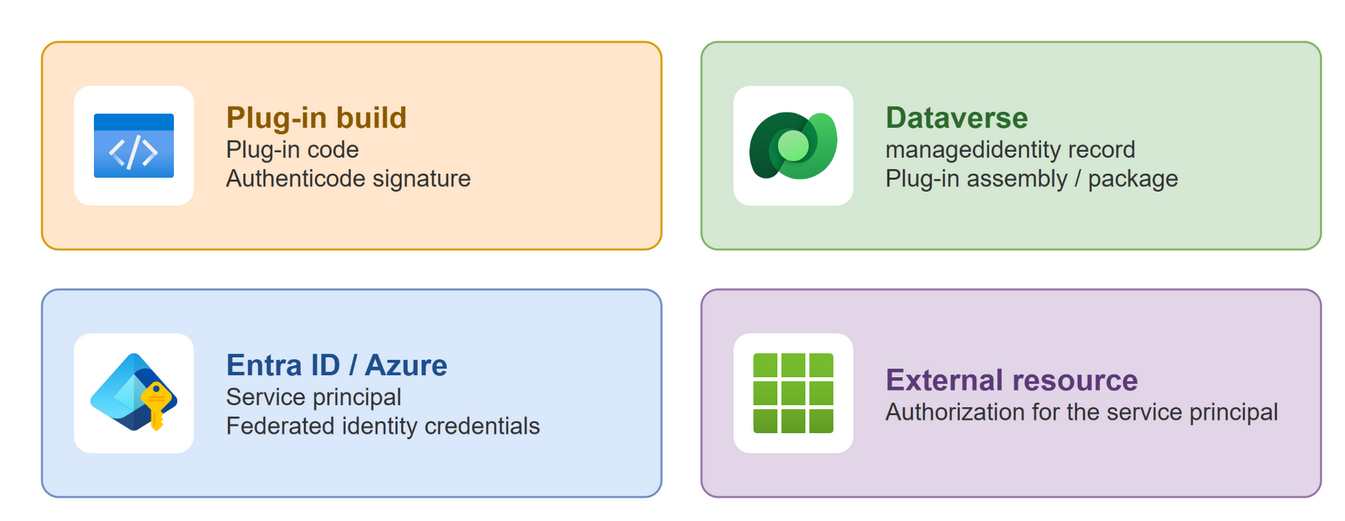
This article tackles the most unclear areas that deserve some attention (highlighted in bold above). To do that, we will be using various tools such as:
- Azure Key Vault - to store the signing certificate private key and do the cryptographic signing
- MSBuild targets - to initiate the code signing of the plug-in assembly / package on every build / pack of the plug-in projects
- SignUniversal.Cli - dotnet tool for cross-platform Authenticode code signing (fetches the public cert from AKV and writes the signature)
- Terraform - declarative provisioning of all of the Azure infra
- Solution framework - to transport the platform’s components, artifacts and customizations
- Package Deployer - a single unit of deployment for (multiple) solutions, CMT data packages and optional customizable deployment logic (defined via
PackageImportExtension).
Why is ALM of plug-in managed identities such a pain #
Let’s start with a small rant. I think the obvious thing that almost everyone I talked to about this agrees on is that the whole Authenticode code signing creates friction, which doesn’t make plug-in managed identities the most popular feature. Authenticode is definitely great if you are distributing software to the public to ensure integrity and prove the publisher identity.
In our use case, the intent of using Authenticode is slightly different than in the case of public distribution. It is meant to establish trust between the owner of the FIC and publisher of the plug-in code. It is totally reasonable and necessary to establish this kind of trust. As the identity owner, you specify not only that the environment is authorized to use this identity, but also that the code needs to be produced by a certain subject, identified by the signing certificate.
Realistically, have you ever met a scenario where the identity owner and the code publisher (who, more often than not, is also administering the Dataverse environment) are not the same team or person? I mean, sure, maybe if you have multiple ISVs deploying solutions to the same environment. It would just be nice if we could opt in to a slightly less restrictive setup where we would simply authorize the whole environment, as that would fit most scenarios (one code publisher / ISV per environment) in my opinion.
Authenticode signing #
For my scenario, the signing is a bit of a necessary evil, so the solution shouldn’t cause that much friction when it comes to automated deployments as well as developer experience. Both are important so we need a solution that works for both local and pipeline builds. That doesn’t mean, though, that we shouldn’t follow security best practices.
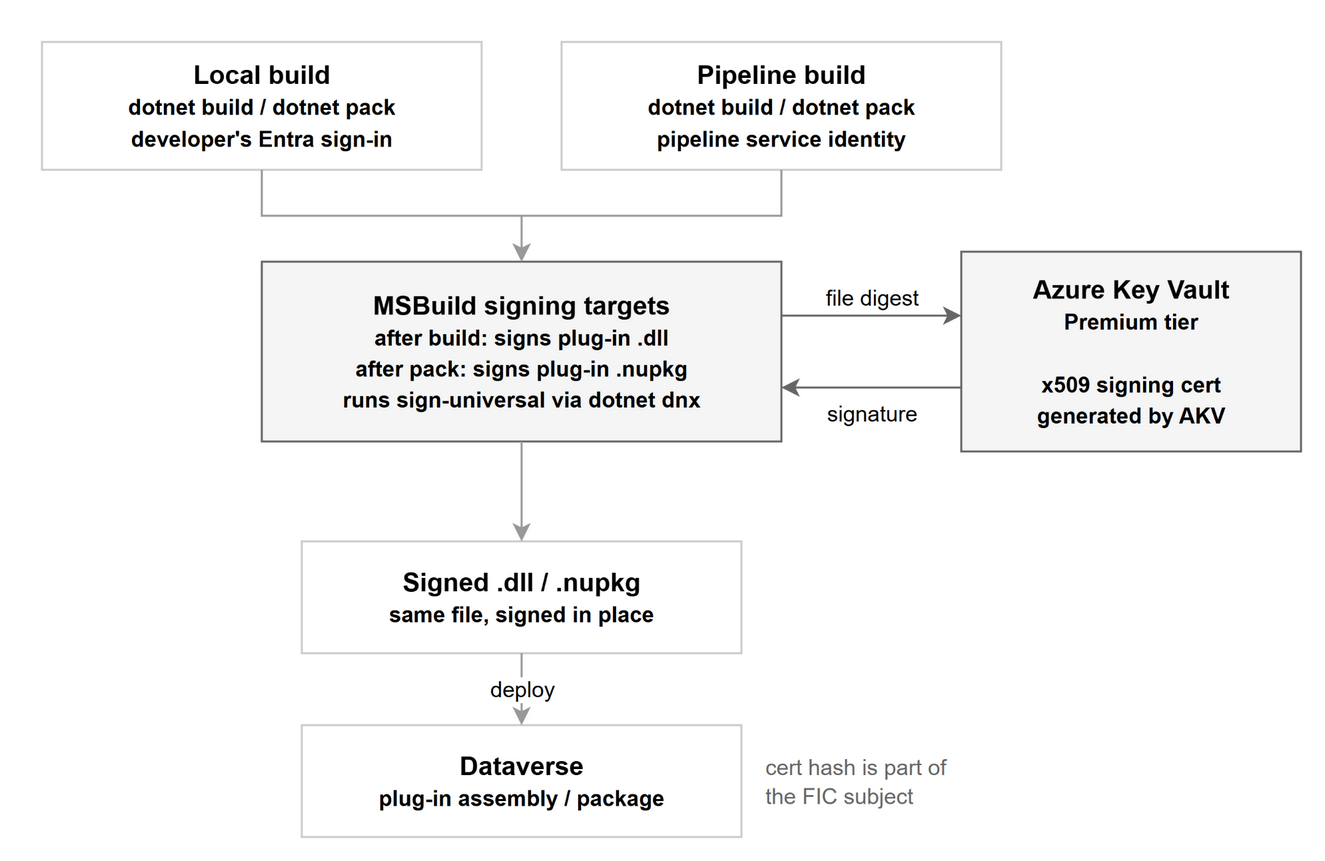
First, the signing is not done solely on a pipeline or local machine, but in combination with a signing Azure Key Vault (AKV). AKV (with Premium tier) can store the private key and also do the private key operations so the key never leaves the AKV boundary. In this scenario, AKV is basically a custodian that keeps the certificate private key safely stored and permits its usage only for authorized principals. In order to be authorized to use the vault’s signing ability, you need to grant Key Vault Crypto User and Key Vault Certificate User to any principal who will be using this (developers, pipeline identity…).
Second, the certificate itself. You can definitely get yourself a signing certificate issued by an established trustworthy issuer (Microsoft recommends it for the production scenarios). Or you can obtain a self-signed certificate by other means. Because we are already using AKV for signing, you can let AKV generate an x509 signing certificate and it will be stored in the AKV right away. You can even opt in to have the private key non-exportable, which is nice, but it also means you will lose the signing certificate if you decide to throw away the given signing AKV instance. In order to create the certificate, the identity that initiates the creation needs to have the Key Vault Administrator role.
Third, handling the signing via a tool during the build process. The AKV operation covers only a small part of the end2end signing process, so the rest of the operations (hashing the DLL / nupkg and inserting the signature) need to be handled on the local / pipeline build machine. There are a couple of options for what to use here - for me it narrowed down to a few, as I need the AKV integration to do the actual signing and I prefer a .NET toolset. The most popular choice would be Sign CLI, maintained by Microsoft. The caveat here is that it works only on Windows machines, so keep that in mind. I decided on a less popular option, sign-universal, which pretty much does the same job as a dotnet tool but works cross-platform.
In scenarios where I need to do some verifications, modifications or other operations during the build process of .NET projects (including Power Platform solutions, plug-ins or other project types), I am a fan of utilizing MSBuild targets to hook into the build process and do my thing. The targets execute tasks regardless of whether we build the project locally or in a pipeline and can be easily reused across multiple projects and repos. We can define a custom target with build runtime parameters that orchestrates the signing. Here is an example of what such a target looks like.
<!-- PROPS -->
<PropertyGroup>
<SignPlugins Condition="'$(SignPlugins)' == ''">true</SignPlugins>
<SigningKeyVaultUrl Condition="'$(SigningKeyVaultUrl)' == ''">$(SIGNING_KEYVAULT_URL)</SigningKeyVaultUrl>
<SigningCertificateName Condition="'$(SigningCertificateName)' == ''">$(SIGNING_CERTIFICATE_NAME)</SigningCertificateName>
<SignUniversalVersion Condition="'$(SignUniversalVersion)' == ''">1.0.39</SignUniversalVersion>
</PropertyGroup>
<!-- TARGETS -->
<!--
Opt in per project in the consuming csproj:
KeyVaultSignOutput = true plug-in assembly: signs the built .dll
KeyVaultSignPackage = true plug-in package: signs the .nupkg after pack
-->
<Target Name="SignOutputWithKeyVault" AfterTargets="CopyFilesToOutputDirectory" Condition="'$(KeyVaultSignOutput)' == 'true'">
<MSBuild Projects="$(MSBuildProjectFullPath)" Targets="SignWithKeyVault" Properties="SigningFile=$([MSBuild]::NormalizePath($(MSBuildProjectDirectory), $(OutDir), $(TargetFileName)))" />
</Target>
<Target Name="SignPackageWithKeyVault" AfterTargets="Pack" Condition="'$(KeyVaultSignPackage)' == 'true'">
<ItemGroup>
<PackedNupkg Include="@(NuGetPackOutput)" Condition="'%(Extension)' == '.nupkg'" />
</ItemGroup>
<MSBuild Projects="$(MSBuildProjectFullPath)" Targets="SignWithKeyVault" Properties="SigningFile=%(PackedNupkg.FullPath)" Condition="'@(PackedNupkg)' != ''" />
</Target>
<Target Name="SignWithKeyVault" Condition="'$(SignPlugins)' == 'true' and '$(SigningFile)' != ''">
<Error Condition="'$(SigningKeyVaultUrl)' == '' or '$(SigningCertificateName)' == ''"
Text="Signing is enabled but SigningKeyVaultUrl and SigningCertificateName (or SIGNING_KEYVAULT_URL and SIGNING_CERTIFICATE_NAME) are not set. Use -p:SignPlugins=false to skip signing." />
<Exec Command="dotnet dnx --yes SignUniversal.Cli@$(SignUniversalVersion) -- sign "$(SigningFile)" --key-vault-url "$(SigningKeyVaultUrl)" --key-vault-certificate "$(SigningCertificateName)" --skip-signed" />
</Target>
If you are interested, check the repo sample for more details on how the targets are defined and consumed in the plug-in projects.
Identity setup #
So now that we have signing more or less set up, we need to establish the trust on both ends. Let’s start with the Entra ID / Azure side as the managed identity provider.
App registration vs user-assigned managed identity #
First things first, we can choose between app registrations and user-assigned managed identity. I would recommend going with the user-assigned managed identity (UAMI) for single tenant scenarios. The reason is that you will most likely run into fewer obstacles in automating the federation configuration (if that is what you are after).
Managing app registrations via other non-human identities (service principals) usually requires some permissions with admin consent, even the more granularly scoped ones such as Application.ReadWrite.OwnedBy (this permission also grants the privilege to create app registrations, which more often than not is not desirable in enterprise scenarios). Yes, there are custom Entra roles that can do the job better than the default permissions, but in my opinion this requires a lot of effort considering what we are trying to achieve.
User-assigned managed identity resources live in your Azure subscriptions, which you will likely have more control over as a developer in your organization compared to the Entra ID control plane, so the permissions barrier is usually smaller to get over for UAMI.
Configuring Federated Identity Credentials (FIC) #
With the service principal provisioned, we need to configure the federated identity credentials on the app registration / UAMI. We need to follow the guidance from Microsoft regarding the format of the Subject identifier.
Trusted issuer:
/eid1/c/pub/t/{encodedTenantId}/a/qzXoWDkuqUa3l6zM5mM0Rw/n/plugin/e/{environmentId}/i/{issuerHash}/s/{subjectHash}
Self-signed:
/eid1/c/pub/t/{encodedTenantId}/a/qzXoWDkuqUa3l6zM5mM0Rw/n/plugin/e/{environmentId}/h/{hash}
This is also a little tricky, depending on how you want to approach calculating the signing certificate hash and encoding the tenant + environment IDs during the deployment. If you want to go the “maximalist” automated route, there are definitely some ways to achieve this. For example, in Terraform, which is used in the complementary code sample, we can invoke custom logic via the external data source extension (the sample builds the subject identifier for self-signed cert scenarios; for a trusted issuer, adjust accordingly).
data "external" "plugin_subject" {
  program = ["pwsh", "-NoProfile", "-NonInteractive", "-File", "${path.module}/scripts/plugin-subject.ps1"]

  query = {
    tenant_id       = data.azurerm_client_config.current.tenant_id
    environment_id  = var.dataverse_environment_id
    certificate_b64 = var.signing_certificate_data_base64
  }
}

resource "azurerm_federated_identity_credential" "dataverse_plugin" {
  name                = var.federated_credential_name
  resource_group_name = var.resource_group_name
  parent_id           = azurerm_user_assigned_identity.this.id
  audience            = ["api://AzureADTokenExchange"]
  issuer              = "https://login.microsoftonline.com/${data.azurerm_client_config.current.tenant_id}/v2.0"
  subject             = data.external.plugin_subject.result.subject
}
$ErrorActionPreference = 'Stop'

$query = [Console]::In.ReadToEnd() | ConvertFrom-Json

# Encoded tenant ID: GUID bytes (first three groups little-endian) as base64url without padding.
$tenantBytes = ([guid]$query.tenant_id).ToByteArray()
$encodedTenant = [Convert]::ToBase64String($tenantBytes).TrimEnd('=').Replace('+', '-').Replace('/', '_')

# Certificate hash: SHA-256 of the DER bytes as lowercase hex.
$certBytes = [Convert]::FromBase64String($query.certificate_b64)
$hash = [Convert]::ToHexString([System.Security.Cryptography.SHA256]::HashData($certBytes)).ToLowerInvariant()

$subject = "/eid1/c/pub/t/$encodedTenant/a/qzXoWDkuqUa3l6zM5mM0Rw/n/plugin/e/$($query.environment_id)/h/$hash"
@{ subject = $subject } | ConvertTo-Json -Compress
Dataverse configuration #
On the Dataverse / Power Platform side, there are a couple of areas that deserve some extra attention, where you might run into some hiccups.
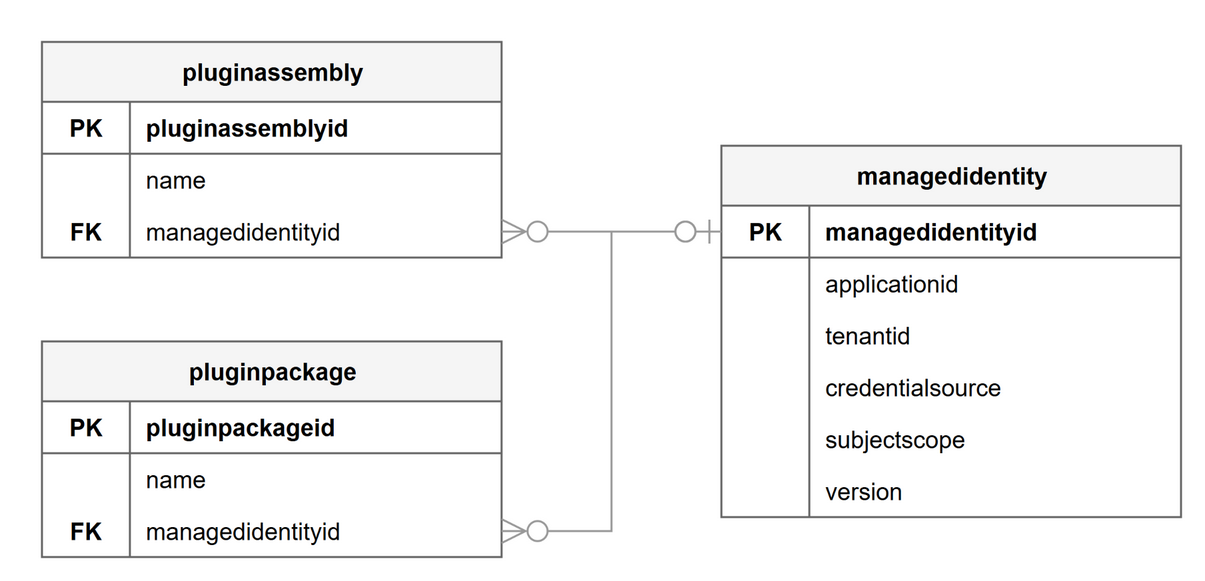
The goal here is to set up a managedidentity solution-aware record, which mirrors the identity properties from our identity provider, Entra ID, and attach that record to the pluginassembly / pluginpackage.
Configuration as Solution components #
Again, Microsoft’s guidance regarding this part is not so polished in my opinion, as it implies that you should always set up the config via direct Dataverse Web API calls.
First, managedidentity is a Solution component framework (SCF) component that should be transported exclusively via managed solutions to other non-development environments. Creating it directly via Web API puts it into an unmanaged state. Second, directly patching managed pluginassembly / pluginpackage artifacts via the API creates an unmanaged layer, which is kind of unacceptable if you are really keen on doing Power Platform ALM properly. It wouldn’t even work in case your downstream environments have blocked unmanaged customizations.
If you are used to creating / modifying solution components first in the dev environment, then create the managedidentity record and attach it to the pluginassembly / pluginpackage as per Microsoft’s guidance, but don’t forget to add the managedidentity to your solution. The unpacked components look like this:
Managed identity component:
<managedidentity managedidentityid="9d01f8c0-84c3-4d48-b430-ed8c6e64647e" xmlns:xsi="http://www.w3.org/2001/XMLSchema-instance">
  <applicationid>{5bbfe605-eccb-42d0-b931-fd918af28e6d}</applicationid>
  <credentialsource>2</credentialsource>
  <identitytype>0</identitytype>
  <iscustomizable>1</iscustomizable>
  <name>smp-dataverse-plugin-uami</name>
  <statecode>0</statecode>
  <statuscode>1</statuscode>
  <subjectscope>1</subjectscope>
  <tenantid>{8a6aefb9-ec29-49f3-b627-6ac43a204ff3}</tenantid>
  <version>2</version>
</managedidentity>
Plug-in assembly metadata with attached managed identity:
<PluginAssembly FullName="Samples.Dataverse.ManagedIdentity.Plugins.PluginAssemblyDemo..." PluginAssemblyId="f801dd37-fa67-45ab-b96a-c4e4206be09b" CustomizationLevel="1" xmlns:xsi="http://www.w3.org/2001/XMLSchema-instance">
  ...
  <ManagedIdentityId>9d01f8c0-84c3-4d48-b430-ed8c6e64647e</ManagedIdentityId>
  <FileName>path/to/Samples.Dataverse.ManagedIdentity.Plugins.PluginAssemblyDemo.dll</FileName>
  <PluginTypes>
    ...
  </PluginTypes>
</PluginAssembly>
Plug-in package metadata with attached managed identity:
<pluginpackage uniquename="smp_Samples.Dataverse.ManagedIdentity.Plugins.PluginPackageDemo">
  <exportkeyversion>1</exportkeyversion>
  <iscustomizable>1</iscustomizable>
  <managedidentityid>
    <managedidentityid>9d01f8c0-84c3-4d48-b430-ed8c6e64647e</managedidentityid>
  </managedidentityid>
  <name>smp_Samples.Dataverse.ManagedIdentity.Plugins.PluginPackageDemo</name>
  <package mimetype="application/octet-stream">smp_Samples.Dataverse.ManagedIdentity.Plugins.PluginPackageDemo.nupkg</package>
  ...
</pluginpackage>
Environment-scoped identity #
In order to follow security best practices, we should avoid using the same managed identity (the Entra ID identity) for all environments. The minimal setup should at least distinguish between the identity used for your production and non-production environments. Otherwise, you would be inherently creating several problems such as:
- Wide blast radius - a shared identity gives access to prod resources
- Violating least privilege principles - Prod needs access to prod resources only. Dev needs access to dev resources only. One identity cannot have both rules.
- Unclear audit logs - If environments use one identity, the logs cannot show which environment made a call (solely based on the identity traces).
This means, however, we need to do a little bit more gymnastics with our solution components. We have two options to tackle this:
- Carry every
managedidentityfor each uniqueapplicationidin your solution and modify thepluginassembly/pluginpackagebinding according to the target environment. - Have a single
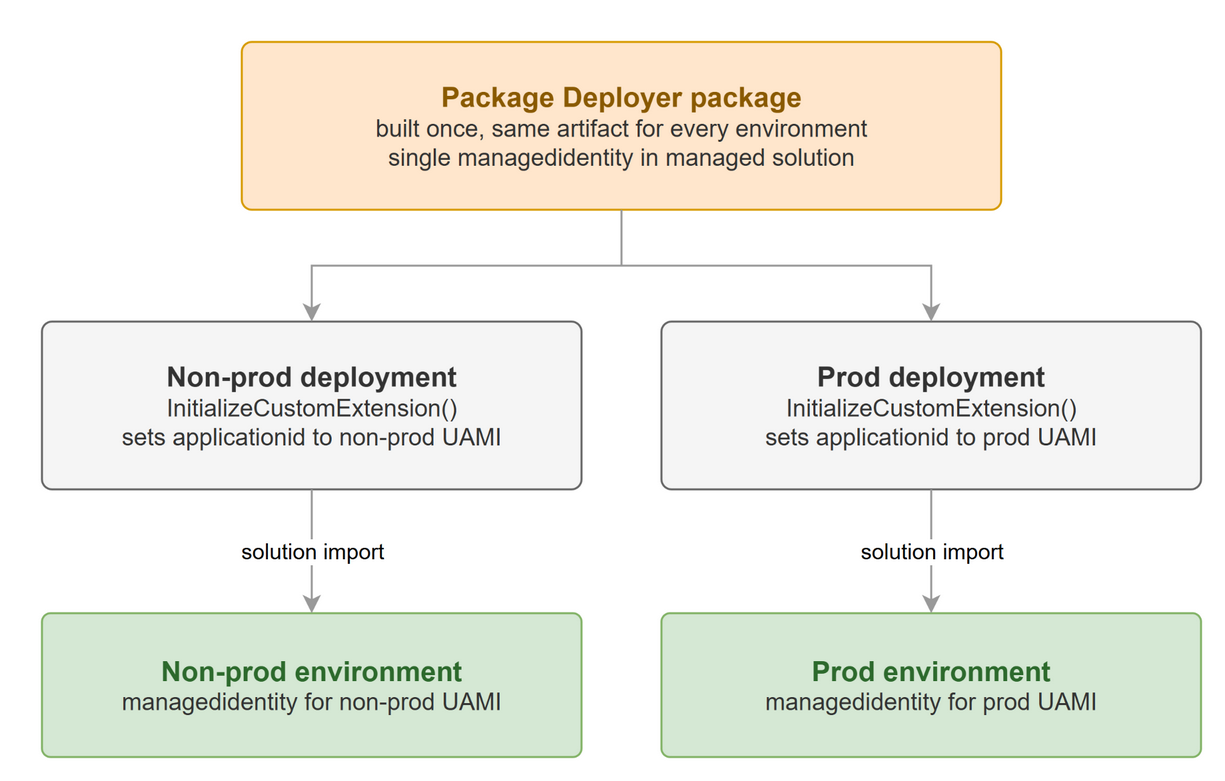
managedidentityand modify theapplicationidaccording to the target environment.
The second option, modifying the applicationid, is a little bit simpler to execute, in my opinion.
So what is the best approach and tool to do such an operation?
The first thing that may come to your mind, if you have been following the rest of the article, is that invoking custom MSBuild targets might seem viable. This would work, however, only if you know during the build process for which environment you are building the solution. If you have a single unified pipeline that builds your solutions every time you initiate a deployment, then all my votes go to MSBuild targets.
If your CI/CD setup has an independent build pipeline that, for example, builds and drops / publishes the produced artifacts on every main / release merge, then you probably need a different approach, and that is to run the modification at deployment time. I am not a big fan of an approach where I do some extra modifications on already built and polished artifacts, but I don’t see any other way unless we want to introduce unmanaged layers to our components. I guess it’s a matter of preference and opinion what you consider the lesser evil.
Personally, if I need to execute some custom logic at deployment time, I recommend utilizing Package Deployer, as it allows hooking into various deployment stages through its PackageImportExtension class. The InitializeCustomExtension() hook method runs before any solution is imported, so it is the right stage to modify the managedidentity configuration.
Of course, the applicationid for the target environment needs to be passed in from outside. The ImportExtension base class has a RuntimeSettings property that holds the custom key-value pairs we pass when invoking the deployment. Alternatively, you can keep the applicationid mappings somewhere else, for example in an asset file of your Package Deployer project. The choice is yours.
Updating existing plug-in assemblies #
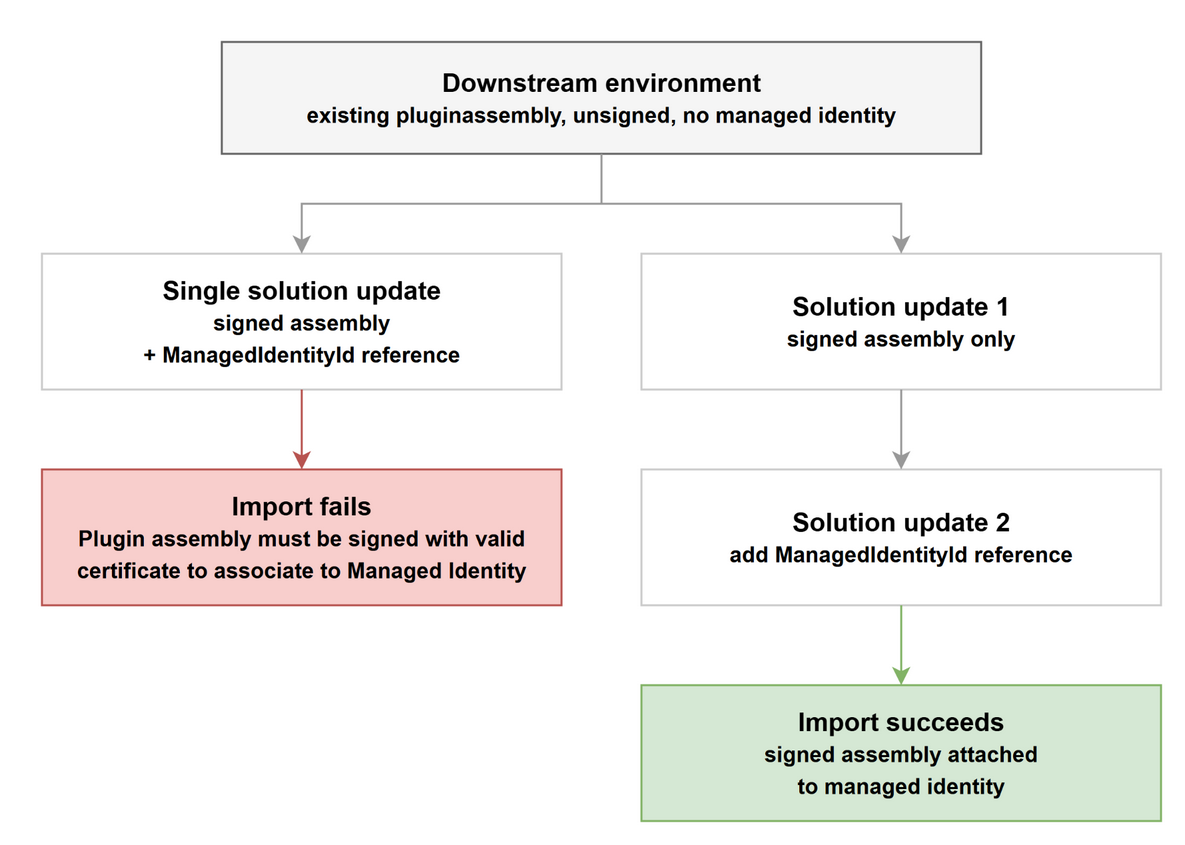
This might be a bit of a niche topic, but it is definitely worth mentioning. There is one scenario: if you already have an unsigned pluginassembly in your downstream environment and you attempt to update it with a signed assembly and attach the managedidentity in a single solution deployment, it will fail with the following error:
Error:Plugin Assemblies import: FAILURE ... Plugin assembly must be signed with valid certificate to associate to Managed Identity
For pluginpackage the single pass update works fine, so this really impacts only the pluginassembly.
In this scenario, you need to deploy the Authenticode signed pluginassembly in the first solution update and add the ManagedIdentityId reference to the assembly metadata in the second run. You can orchestrate that through the deployment tools, such as Package Deployer, or just do this as manual steps for all of your downstream environments.
Putting it all together #
We addressed multiple areas that are a bit tricky to set up, especially if you want to keep your ALM hygiene clean and sustainable, yet still want to use managed identities in Dataverse plug-ins.
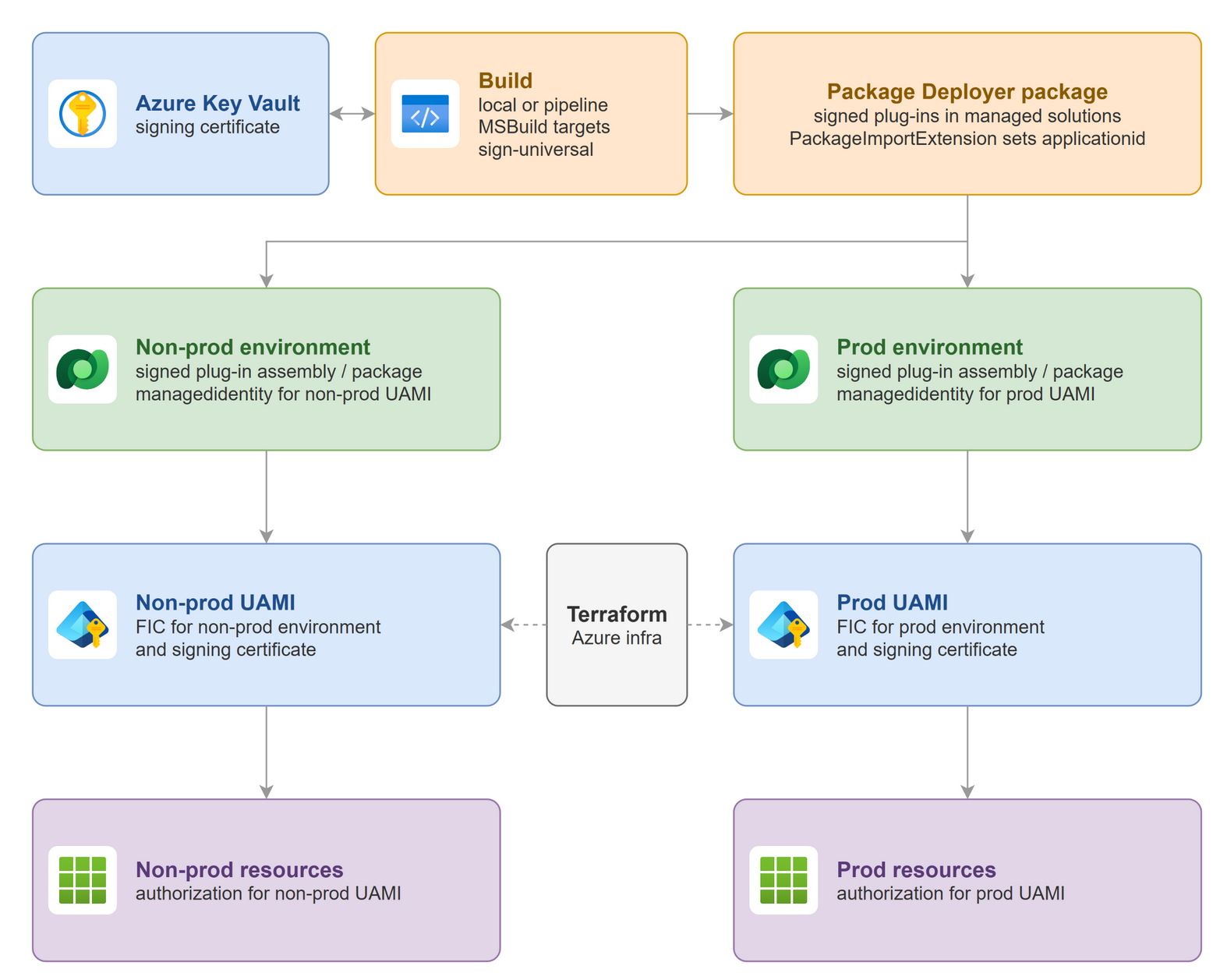
The toolset selection and solution concepts are definitely opinionated, so if you decide to follow any of the mentioned practices, take some time to understand the concepts and reasoning, as the design decisions in any serious software development are still yours to own, even now in late 2026 and (hopefully) beyond.